
GGather: Intuitive Bookmark Management for Digital Clarity
The developer did not provide additional system requirements.
Overview
GGather is a modern desktop application designed to streamline the process of saving, organizing, and retrieving digital content. Built for users who frequently encounter articles, images, and videos they wish to revisit, GGather eliminates the risk of losing valuable online resources. The software functions as a centralized personal knowledge base, enabling users to collect and manage content with minimal friction. Its primary purpose is to enhance productivity by simplifying web clipping and digital organization, making it ideal for researchers, students, creatives, and professionals who rely on consistent access to curated online materials.
Unlike traditional bookmark managers, GGather emphasizes intuitive navigation and flexible tagging. The platform supports saving any type of web content—text, images, or videos—directly within the app, allowing users to view and interact with their saved items without leaving the application. This seamless workflow reduces context switching and supports deeper engagement with stored information. Real-world usage includes compiling research materials for academic work, curating visual inspiration for design projects, or building a personal library of long-form articles for later reading.
GGather’s cloud synchronization feature ensures that saved content remains accessible across devices, maintaining continuity in workflows. The developer, GGather, has focused on delivering a clean, user-centric experience, evident in the consistent updates and refinements to both the desktop app and browser extension. While no detailed developer background is available, the software’s evolution reflects a commitment to usability and performance, particularly through iterative improvements in speed, interface design, and feature integration.
Key Features & Capabilities
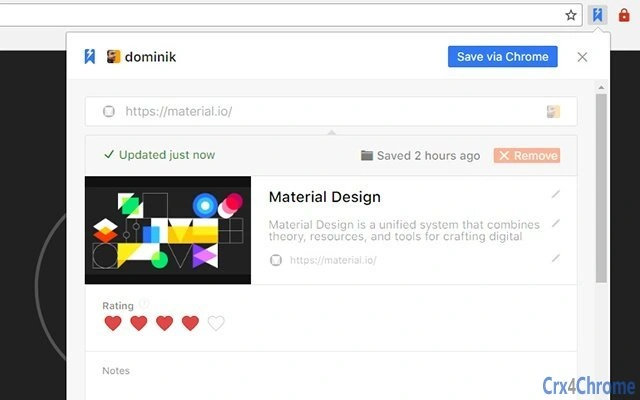
- Universal Content Saving – Save articles, images, and videos directly from the browser with a single click. The lightweight save widget enables fast capture without interrupting browsing.
- Customizable Tagging System – Use human-friendly tags to organize bookmarks. Tags can be nested under parent tags, allowing for hierarchical organization that adapts to individual workflows.
- Cloud Sync Across Devices – Automatic synchronization ensures that saved content is available on all devices linked to the same account, maintaining consistency in digital workflows.
- Search & Filtering – A rewritten search engine provides fast, accurate results. Users can filter bookmarks by tag, subtag, or custom criteria, improving retrieval efficiency.
- Public Tag Sharing – Optionally make tags public to allow discovery and subscription by other users. This fosters community-driven organization and collaborative knowledge sharing.
- Custom Thumbnails – Choose from website content images, generate thumbnails from URLs, or upload custom images to personalize bookmark previews.
- Batch Actions – Select multiple bookmarks to open, delete, or manage simultaneously, enhancing workflow efficiency for bulk operations.
These features support real-world use cases such as building a research repository, maintaining a visual mood board, or organizing content for content creation projects. The ability to save and view content without switching contexts reduces cognitive load and increases focus. The tagging system’s flexibility allows users to adapt the app to their specific organizational style, whether linear, thematic, or project-based.
User Interface, Workflow & Performance
GGather features a clean, modern interface with a redesigned sidebar and improved drag-and-drop interactions. The layout emphasizes accessibility, with intuitive navigation and consistent visual cues. Users can toggle favicon visibility and customize default item layouts to suit their preferences. The interface is responsive, with smooth transitions and polished interactions, particularly in the latest version.
Workflow efficiency is enhanced by features like the right-click access to the library via the browser extension and the ability to use a lightweight save widget. The selection mode, now available for free accounts, allows users to manage multiple bookmarks at once, streamlining tasks such as archiving or sharing. The app’s performance has seen significant improvements over time, with reported load speed increases of 500–1000% in earlier versions. The latest update includes further optimizations and a dark app theme for improved visual comfort during extended use.
While specific resource usage details were not provided, the application’s iterative performance enhancements suggest a focus on efficiency. Stability appears to be a priority, with consistent updates addressing bugs and refining user experience. The developer did not specify CPU or RAM behavior, but general software behavior patterns indicate efficient operation under standard conditions.
Compatibility & System Requirements
GGather is compatible with Windows and Mac operating systems, supporting both desktop platforms. The application is available in version 1.15.0 and has a file size of 104.6 MB. Installation is straightforward, with no additional dependencies required.
Exact system requirements were not listed. The developer did not specify minimum hardware specifications, such as processor speed, RAM, or disk space. Compatibility information is limited to the operating systems mentioned. Users are advised to ensure their system meets general desktop application requirements for smooth operation.
Pros and Cons
Pros
- Intuitive interface with modern design and smooth navigation
- Flexible, human-friendly tagging system with hierarchical support
- Fast, accurate search functionality with filtering capabilities
- Cloud sync ensures access across multiple devices
- Customizable thumbnails and save options for personalization
- Batch selection and management for improved efficiency
- Free version includes essential features like select mode
Cons
- No detailed system requirements provided
- Resource usage (CPU/RAM) not specified
- Public sharing feature may raise privacy concerns for some users
- Full advanced features require a paid plan (GGather Plus)
- Limited developer background information
FAQ Section
Is GGather compatible with Windows and Mac?
Yes, GGather is available for both Windows and Mac operating systems.
Is GGather free to use?
Yes, GGather offers a free version with core features such as content saving, tagging, and basic search. Advanced features are available through the GGather Plus subscription.
Does GGather sync across devices?
Yes, automatic account synchronization is enabled, ensuring your bookmarks are accessible on all devices linked to your account.
Can I use GGather offline?
While the app supports offline access to saved content, full functionality, including cloud sync and updates, requires an internet connection.
What kind of content can I save with GGather?
You can save articles, images, videos, and any other web content directly from your browser using the integrated extension.
Final Thoughts + CTA
GGather stands out as a thoughtful, user-focused solution for managing digital content. Its intuitive design, powerful tagging system, and seamless cloud integration make it a strong choice for anyone seeking to organize their online life more effectively. The free tier offers substantial functionality, while the paid upgrade provides enhanced tools for advanced users. With continuous improvements in performance and interface polish, GGather demonstrates a clear commitment to usability and long-term value.
For researchers, creatives, and knowledge workers, GGather delivers a reliable, efficient way to save and retrieve information without friction. Its emphasis on simplicity, customization, and cross-device access makes it a standout in the productivity software landscape.
Download GGather now







